The HTML <ul> tag
The HTML <ul> element represents an unordered list: a list whose item order does not matter, rendered with bullets by default. Its direct children must be <li> (list item) elements.
Overview
The <ul> (unordered list) element groups a set of items where sequence is not significant: navigation links, feature lists, tags. Browsers render each <li> with a bullet marker by default.
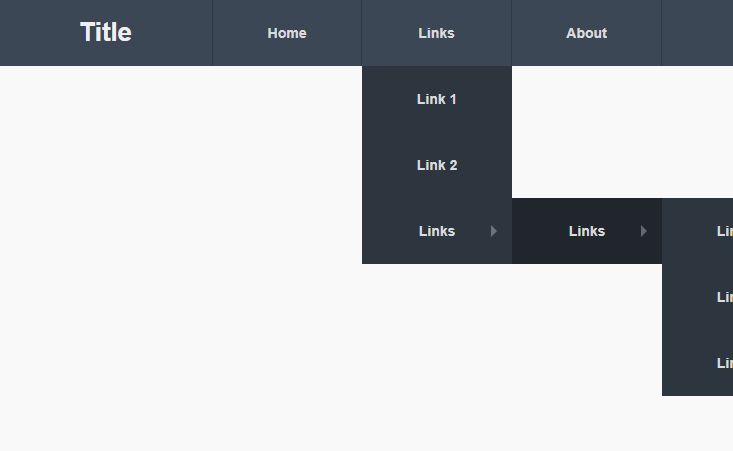
Its only permitted direct children are <li> elements (plus script-supporting elements). Style the markers and spacing with CSS; list-style-type changes or removes the bullets, which is how navigation menus are built from lists. Use an <ol> instead when the order matters.
Syntax
<ul>
  <li>First item</li>
  <li>Second item</li>
</ul>
Example
<ul>
  <li>HTML</li>
  <li>CSS</li>
  <li>JavaScript</li>
</ul>
More Examples
Best practices
Accessibility
Lists are announced by screen readers with their item count ("list, 5 items"), which helps users understand the structure, so use a real <ul> rather than faking bullets with text. If you remove the bullets with list-style: none, some browsers may drop the list semantics in certain contexts; keeping the list markup intact preserves the meaning.
Frequently asked questions
What is the difference between <ul> and <ol>?
<ul> when the order of items does not matter (bulleted), and <ol> when it does (numbered).What can go inside a <ul>?
<li> items.How do I make a navigation menu with a list?
<ul> of links in a <nav>, then style the list with CSS (often display: flex and list-style: none).How do I remove the bullet points from a list?
ul { list-style: none; padding: 0; margin: 0; }. This is the standard way to build a navigation menu from a list.






















