Charging someone once is easy. Charging them every month, and knowing on any given day whether they are still paid up, is where subscription code usually goes wrong.
The mistake is treating the payment page as the finish line. A customer pays, the browser redirects back, you flip a flag, and everyone is happy until a card expires or someone cancels and your database never hears about it.
We'll build it the way it actually holds up: Stripe Checkout takes the money, a webhook tells your server what happened, and your database follows Stripe rather than guessing.
Create a Checkout session in subscription mode and put your user's ID in client_reference_id. Then listen for checkout.session.completed on a webhook, verify it with \Stripe\Webhook::constructEvent(), and save the status and period end to your own table. Check access against that table, never the redirect.
Contents
1. How a Subscription Works
There are two paths in a subscription system, and only one of them can tell you what happened. The first is the customer's browser: they click subscribe, pay on Stripe, and get redirected back to you.
The second is the webhook: Stripe sends your server a message describing what happened. That second path is the one that matters, because it keeps arriving long after the customer has closed the tab.
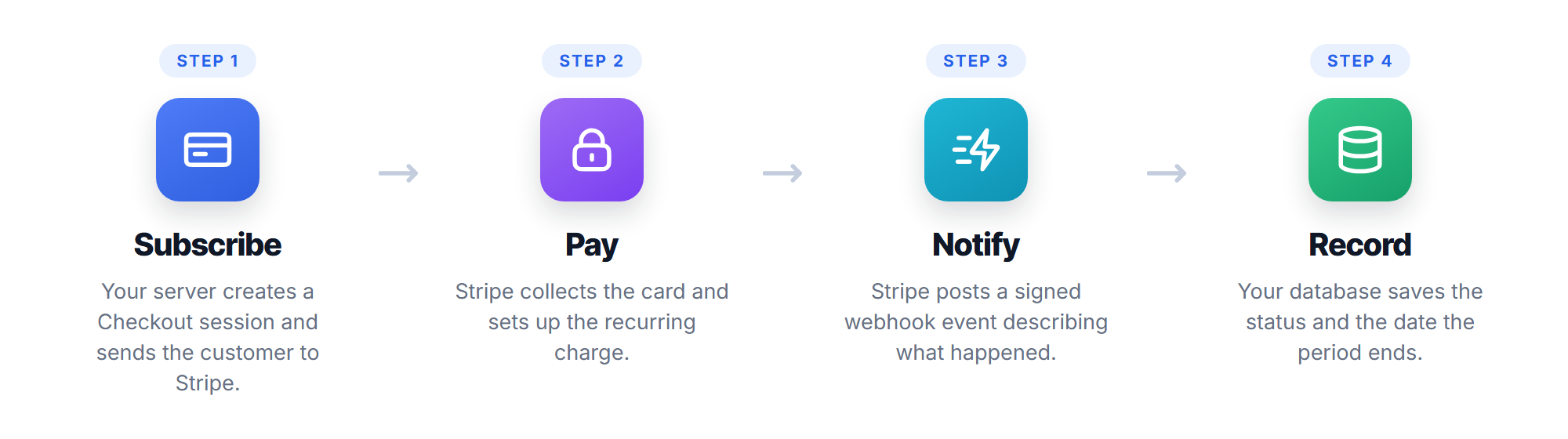
- Subscribe. Your server creates a Checkout session and redirects the customer to Stripe.
- Pay. Stripe collects the card details and sets up the recurring charge.
- Notify. Stripe sends a webhook event to your server describing the new subscription.
- Record. Your server saves the status and the date the paid period ends.
Renewals, failed payments and cancellations all arrive the same way, months later, with no browser involved. That is why the webhook is the source of truth.
It is worth being clear about what you are not building. Stripe holds the card, runs the monthly charge, retries a decline and handles the receipts. Your job is only to listen and keep a record.
2. Setting Up the Database
You need somewhere to record what Stripe told you. Two tables: the accounts you already have, with a few subscription columns added, and a small table that remembers which events you have processed.
-- Your existing accounts table, with the subscription state added.
CREATE TABLE IF NOT EXISTS accounts (
    id INT AUTO_INCREMENT PRIMARY KEY,
    email VARCHAR(190) NOT NULL,
    password VARCHAR(255) NOT NULL,
    stripe_customer_id VARCHAR(64) DEFAULT NULL,
    stripe_subscription_id VARCHAR(64) DEFAULT NULL,
    sub_status VARCHAR(32) NOT NULL DEFAULT 'none',
    sub_period_end DATETIME DEFAULT NULL,
    UNIQUE KEY email (email)
) ENGINE=InnoDB DEFAULT CHARSET=utf8mb4;

-- One row per webhook event we have already handled, so a repeat delivery
-- does nothing the second time.
CREATE TABLE IF NOT EXISTS stripe_events (
    id INT AUTO_INCREMENT PRIMARY KEY,
    event_id VARCHAR(64) NOT NULL,
    created DATETIME NOT NULL,
    UNIQUE KEY event_id (event_id)
) ENGINE=InnoDB DEFAULT CHARSET=utf8mb4;
The sub_period_end column is the one people leave out, and it is the reason cancellations get handled badly. Someone who cancels has usually paid through to the end of the month, so they keep access until that date.
The rest of this tutorial is for members
You have read the opening. The remaining sections cover the full build, the code, and the mistakes worth avoiding.
- The rest of this tutorial and every other members-only guide
- All 16 packages, source included
- No ads anywhere on the site
Already a member? Sign in























