A login system is only half the story; without a registration form you'd be creating every account by hand in phpMyAdmin. Here we'll build a secure registration system with PHP and MySQL that validates the details, hashes the password, and inserts the account with prepared statements.
It's the follow-up to our Secure Login System and plugs into the same database, though you can follow it on its own. Prefer a finished product? The Advanced Package adds email activation, remember me, an admin panel, and PDO and MVC versions.
To build a secure registration system in PHP, validate the submitted username, email and password, confirm the account doesn't already exist, hash the password with password_hash(), and insert the new row with a prepared statement. Never store the password as plain text.
Want the finished code? The free download and the Advanced Package are at the end of this tutorial.
Contents
- Getting Started
- How the Registration System Works
- Creating the Registration Form with HTML and CSS
- Setting Up the MySQL Database
- Registering Users with PHP and MySQL
- Validating the Registration Form Data
- Adding Email Verification (Account Activation)
- Making Your Registration System More Secure
- Common Problems and How to Fix Them
- Frequently Asked Questions
1. Getting Started
If you followed the login tutorial, your environment is ready, so jump to the file structure and create the two new files. Starting fresh? Here's what you need.
1.1. Requirements
- No local server yet? Download and install XAMPP; it bundles Apache, PHP, MySQL (MariaDB), and phpMyAdmin in one installer.
- Any PHP version from 7.4 through 8.5 works with the
mysqliextension enabled (it is by default in XAMPP).
1.2. What You Will Learn in this Tutorial
- Form design: build a signup form with HTML and CSS that sends the username, email, and password to the server.
- Password hashing: store passwords the right way with
password_hash(). - Prepared statements: insert new records into MySQL safely and shut the door on SQL injection.
- Server-side validation: check the email, username, and password length before anything touches the database.
- Account activation: optionally make users confirm their email address via a unique link.
1.3. File Structure & Setup
Start Apache and MySQL from the XAMPP control panel, open the htdocs directory (C:\xampp\htdocs), and create these files inside a phplogin folder (create it if you don't have one from the login tutorial):
File Structure
\-- phplogin
|-- register.php
|-- register-process.php
|-- style.css
|-- activate.php (optional)
- register.php: the signup form.
- register-process.php: validates, hashes, and inserts the account.
- style.css: the stylesheet, shared with the login system.
- activate.php: activates an account from the emailed link (optional, section 7).
2. How the Registration System Works
Here's what happens when a visitor creates an account:
- The visitor fills in a username, email and password on register.php and submits the form.
- The browser sends the three values to register-process.php in a POST request.
- PHP validates the input: every field present, the email shaped like an email, the username alphanumeric, the password long enough.
- A prepared statement checks whether the username is already taken in the accounts table.
- The password is hashed with
password_hash()and a prepared INSERT adds the new account to the database.
With activation enabled there's one extra hop: the user gets an email link with a unique code, and activate.php flips the account to active when it's clicked. From there, the login system takes over.
3. Creating the Registration Form with HTML and CSS
The signup form is nearly identical to the login form, with one extra input field for the email address, plus a short PHP check that redirects anyone already logged in to the home page.
Edit the register.php file and add the following code:
<?php
// We need to use sessions, so you should always initialize sessions using the below function
session_start();
// If the user is logged in, redirect to the home page
if (isset($_SESSION['account_loggedin'])) {
	header('Location: home.php');
	exit;
}
?>
<!DOCTYPE html>
<html>
	<head>
		<meta charset="utf-8">
		<meta name="viewport" content="width=device-width,minimum-scale=1">
		<title>Register</title>
	</head>
	<body>
		<div class="login">

			<h1>Member Register</h1>

			<form action="register-process.php" method="post" class="form login-form">

				<label class="form-label" for="username">Username</label>
				<div class="form-group">
					<svg class="form-icon-left" width="14" height="14" xmlns="http://www.w3.org/2000/svg" viewBox="0 0 448 512"><!--!Font Awesome Free 6.5.1 by @fontawesome - https://fontawesome.com License - https://fontawesome.com/license/free Copyright 2024 Fonticons, Inc.--><path d="M224 256A128 128 0 1 0 224 0a128 128 0 1 0 0 256zm-45.7 48C79.8 304 0 383.8 0 482.3C0 498.7 13.3 512 29.7 512H418.3c16.4 0 29.7-13.3 29.7-29.7C448 383.8 368.2 304 269.7 304H178.3z"/></svg>
					<input class="form-input" type="text" name="username" placeholder="Username" id="username" required>
				</div>

				<label class="form-label" for="email">Email</label>
				<div class="form-group">
					<svg class="form-icon-left" xmlns="http://www.w3.org/2000/svg" width="14" height="14" viewBox="0 0 512 512"><!--!Font Awesome Free 6.5.1 by @fontawesome - https://fontawesome.com License - https://fontawesome.com/license/free Copyright 2024 Fonticons, Inc.--><path d="M48 64C21.5 64 0 85.5 0 112c0 15.1 7.1 29.3 19.2 38.4L236.8 313.6c11.4 8.5 27 8.5 38.4 0L492.8 150.4c12.1-9.1 19.2-23.3 19.2-38.4c0-26.5-21.5-48-48-48H48zM0 176V384c0 35.3 28.7 64 64 64H448c35.3 0 64-28.7 64-64V176L294.4 339.2c-22.8 17.1-54 17.1-76.8 0L0 176z"/></svg>
					<input class="form-input" type="email" name="email" placeholder="Email" id="email" required>
				</div>

				<label class="form-label" for="password">Password</label>
				<div class="form-group mar-bot-5">
					<svg class="form-icon-left" xmlns="http://www.w3.org/2000/svg" width="14" height="14" viewBox="0 0 448 512"><!--!Font Awesome Free 6.5.1 by @fontawesome - https://fontawesome.com License - https://fontawesome.com/license/free Copyright 2024 Fonticons, Inc.--><path d="M144 144v48H304V144c0-44.2-35.8-80-80-80s-80 35.8-80 80zM80 192V144C80 64.5 144.5 0 224 0s144 64.5 144 144v48h16c35.3 0 64 28.7 64 64V448c0 35.3-28.7 64-64 64H64c-35.3 0-64-28.7-64-64V256c0-35.3 28.7-64 64-64H80z"/></svg>
					<input class="form-input" type="password" name="password" placeholder="Password" id="password" autocomplete="new-password" required>
				</div>

				<button class="btn blue" type="submit">Register</button>

				<p class="register-link">Already have an account? <a href="index.php" class="form-link">Login</a></p>

			</form>

		</div>
	</body>
</html>
Navigate to the registration page (localhost/phplogin/register.php) and our form looks like this:
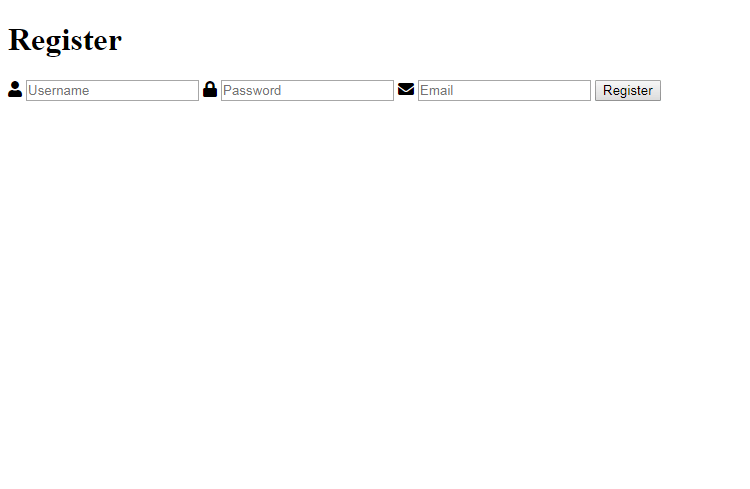
Bare bones, but working. If you followed the login tutorial, the styling is done already; the registration form reuses the same classes. Otherwise, add the following to the style.css file:
* {
    box-sizing: border-box;
    font-family: system-ui, "Segoe UI", Roboto, Helvetica, Arial, sans-serif, "Apple Color Emoji", "Segoe UI Emoji", "Segoe UI Symbol";
    font-size: 16px;
}
body, html {
    background-color: #f3f5f7;
    margin: 0;
    padding: 0;
}
h1, h2, h3, h4, h5, h6 {
    margin: 0;
    padding: 0;
    color: #474b50;
}
.form {
    display: flex;
    flex-flow: column;
    width: 100%;
}
.form .form-label {
    display: block;
    padding: 20px 0 10px 0;
    font-weight: 500;
    font-size: 14px;
    color: #474b50;
}
.form .form-group {
    display: flex;
    position: relative;
    justify-content: space-between;
    align-items: center;
    width: 100%;
}
.form .form-group .form-icon-left, .form .form-group .form-icon-right {
    fill: #c1c6cb;
    width: 40px;
    position: absolute;
    transform: translateY(-50%);
    top: 50%;
    pointer-events: none;
}
.form .form-group .form-icon-left {
    left: 0;
}
.form .form-group .form-icon-left + .form-input {
    padding-left: 40px;
}
.form .form-group .form-icon-right {
    right: 0;
}
.form .form-group .form-icon-right + .form-input {
    padding-right: 40px;
}
.form .form-group:focus-within .form-icon-left {
    fill: #989fa8;
}
.form .form-input {
    width: 100%;
    height: 43px;
    border: 1px solid #dee1e6;
    padding: 0 15px;
    border-radius: 4px;
    color: #000;
}
.form .form-input::placeholder {
    color: #989fa8;
}
.form .form-link {
    color: #2a8eeb;
    font-weight: 500;
    text-decoration: none;
    font-size: 14px;
}
.form .form-link:hover {
    color: #136fc5;
}
.form p.register-link {
    margin: 0;
    padding: 20px 0 0 0;
    font-size: 14px;
    color: #6b7179;
}
.btn {
    display: inline-flex;
    align-items: center;
    justify-content: center;
    text-decoration: none;
    appearance: none;
    cursor: pointer;
    border: 0;
    background-color: #3e7bd6;
    color: #FFFFFF;
    padding: 0 14px;
    font-size: 14px;
    font-weight: 600;
    border-radius: 4px;
    height: 42px;
    box-shadow: 0px 0px 6px 1px rgba(45, 57, 68, 0.1);
}
.btn:hover {
    background-color: #3172d3;
}
.login, .register {
    display: flex;
    flex-flow: column;
    width: 400px;
    max-width: 95%;
    background-color: #ffffff;
    box-shadow: 0px 0px 7px 1px rgba(45, 57, 68, 0.05);
    border-radius: 5px;
    margin: 100px auto;
    padding: 35px;
}
.login h1, .register h1 {
    text-align: center;
    font-size: 24px;
    font-weight: 500;
    padding: 15px 0;
    margin: 0;
}
.pad-1 { padding: 5px; }
.mar-1 { margin: 5px; }
.pad-2 { padding: 10px; }
.mar-2 { margin: 10px; }
.pad-3 { padding: 15px; }
.mar-3 { margin: 15px; }
.pad-4 { padding: 20px; }
.mar-4 { margin: 20px; }
.pad-5 { padding: 25px; }
.mar-5 { margin: 25px; }
.pad-bot-1 { padding-bottom: 5px; }
.pad-top-1 { padding-top: 5px; }
.pad-left-1 { padding-left: 5px; }
.pad-right-1 { padding-right: 5px; }
.pad-x-1 { padding-left: 5px; padding-right: 5px; }
.pad-y-1 { padding-top: 5px; padding-bottom: 5px; }
.mar-bot-1 { margin-bottom: 5px; }
.mar-top-1 { margin-top: 5px; }
.mar-left-1 { margin-left: 5px; }
.mar-right-1 { margin-right: 5px; }
.mar-x-1 { margin-left: 5px; margin-right: 5px; }
.mar-y-1 { margin-top: 5px; margin-bottom: 5px; }
.pad-bot-2 { padding-bottom: 10px; }
.pad-top-2 { padding-top: 10px; }
.pad-left-2 { padding-left: 10px; }
.pad-right-2 { padding-right: 10px; }
.pad-x-2 { padding-left: 10px; padding-right: 10px; }
.pad-y-2 { padding-top: 10px; padding-bottom: 10px; }
.mar-bot-2 { margin-bottom: 10px; }
.mar-top-2 { margin-top: 10px; }
.mar-left-2 { margin-left: 10px; }
.mar-right-2 { margin-right: 10px; }
.mar-x-2 { margin-left: 10px; margin-right: 10px; }
.mar-y-2 { margin-top: 10px; margin-bottom: 10px; }
.pad-bot-3 { padding-bottom: 15px; }
.pad-top-3 { padding-top: 15px; }
.pad-left-3 { padding-left: 15px; }
.pad-right-3 { padding-right: 15px; }
.pad-x-3 { padding-left: 15px; padding-right: 15px; }
.pad-y-3 { padding-top: 15px; padding-bottom: 15px; }
.mar-bot-3 { margin-bottom: 15px; }
.mar-top-3 { margin-top: 15px; }
.mar-left-3 { margin-left: 15px; }
.mar-right-3 { margin-right: 15px; }
.mar-x-3 { margin-left: 15px; margin-right: 15px; }
.mar-y-3 { margin-top: 15px; margin-bottom: 15px; }
.pad-bot-4 { padding-bottom: 20px; }
.pad-top-4 { padding-top: 20px; }
.pad-left-4 { padding-left: 20px; }
.pad-right-4 { padding-right: 20px; }
.pad-x-4 { padding-left: 20px; padding-right: 20px; }
.pad-y-4 { padding-top: 20px; padding-bottom: 20px; }
.mar-bot-4 { margin-bottom: 20px; }
.mar-top-4 { margin-top: 20px; }
.mar-left-4 { margin-left: 20px; }
.mar-right-4 { margin-right: 20px; }
.mar-x-4 { margin-left: 20px; margin-right: 20px; }
.mar-y-4 { margin-top: 20px; margin-bottom: 20px; }
.pad-bot-5 { padding-bottom: 25px; }
.pad-top-5 { padding-top: 25px; }
.pad-left-5 { padding-left: 25px; }
.pad-right-5 { padding-right: 25px; }
.pad-x-5 { padding-left: 25px; padding-right: 25px; }
.pad-y-5 { padding-top: 25px; padding-bottom: 25px; }
.mar-bot-5 { margin-bottom: 25px; }
.mar-top-5 { margin-top: 25px; }
.mar-left-5 { margin-left: 25px; }
.mar-right-5 { margin-right: 25px; }
.mar-x-5 { margin-left: 25px; margin-right: 25px; }
.mar-y-5 { margin-top: 25px; margin-bottom: 25px; }
Then include the stylesheet in the head section of register.php:
<link href="style.css" rel="stylesheet" type="text/css">Refresh the page, and the form takes shape:
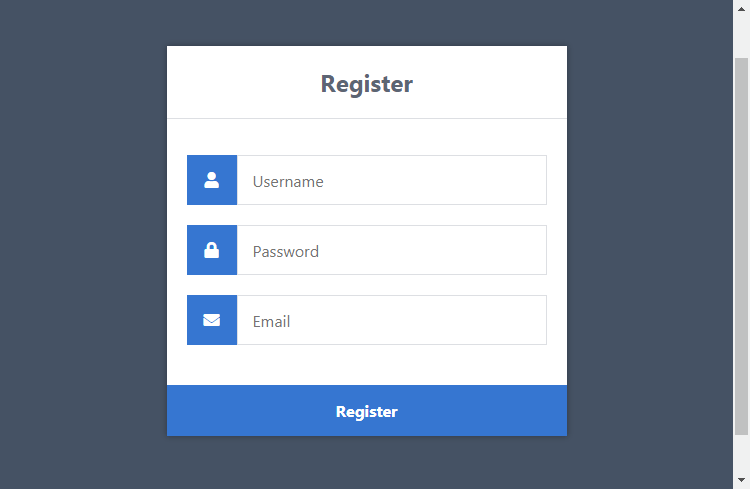
The form elements doing the heavy lifting:
- Form: the
actionattribute points at register-process.php, andmethod="post"keeps the details in the request body instead of the URL. - Input fields: each field's
nameattribute is how PHP identifies it, so the username arrives as$_POST['username']. The email input usestype="email", which flags mistakes in real time, a small user experience win. - Password field:
autocomplete="new-password"tells the browser to offer a generated password instead of autofilling a saved one.
That's the client side done; everything else happens on the server.
4. Setting Up the MySQL Database
Skip this step if you followed the Secure Login System tutorial; you already have this exact table.
Most people on XAMPP manage their database with phpMyAdmin, so that's what these steps use:
- In the XAMPP control panel, click Admin next to MySQL
- Click the Databases tab, enter phplogin as the name, select utf8mb4_unicode_ci as the collation, and click Create
Everything lives in one accounts table: usernames, hashed passwords, emails, and registration dates. Select the phplogin database on the left and run this SQL:
CREATE TABLE IF NOT EXISTS `accounts` (
	`id` int(11) NOT NULL AUTO_INCREMENT,
	`username` varchar(50) NOT NULL,
	`password` varchar(255) NOT NULL,
	`email` varchar(100) NOT NULL,
	`registered` datetime NOT NULL,
	PRIMARY KEY (`id`)
) ENGINE=InnoDB AUTO_INCREMENT=2 DEFAULT CHARSET=utf8mb4 COLLATE=utf8mb4_unicode_ci;

INSERT INTO `accounts` (`id`, `username`, `password`, `email`, `registered`) VALUES (1, 'test', '$2y$10$SfhYIDtn.iOuCW7zfoFLuuZHX6lja4lF4XA4JqNmpiH/.P3zB8JCa', 'test@example.com', '2025-01-01 00:00:00');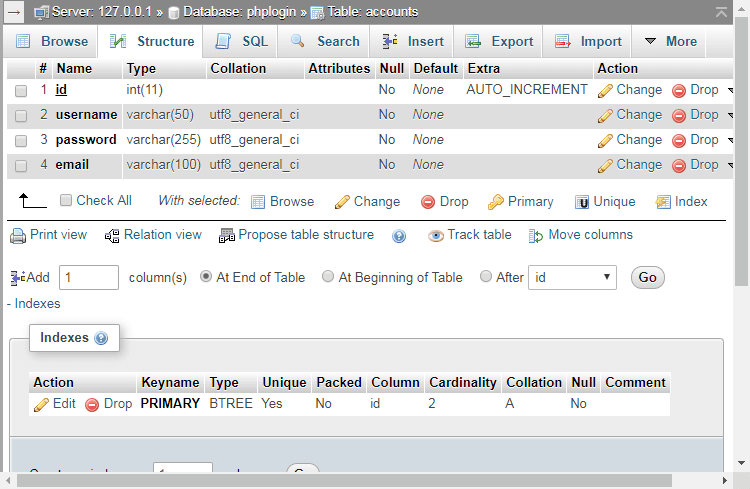
The password column is varchar(255) because PHP's hashing algorithms evolve; if the column is ever too short, the insert fails, or on an older non-strict server the hash is truncated and logins fail forever.
5. Registering Users with PHP and MySQL
Now for the processing file. Edit register-process.php and add the complete file below; the walkthrough after it goes through it piece by piece:
<?php
// Change the below variables to reflect your MySQL database details
$DATABASE_HOST = 'localhost';
$DATABASE_USER = 'root';
$DATABASE_PASS = '';
$DATABASE_NAME = 'phplogin';
// Try and connect using the info above
$con = mysqli_connect($DATABASE_HOST, $DATABASE_USER, $DATABASE_PASS, $DATABASE_NAME);
// Check for connection errors
if (mysqli_connect_errno()) {
	// If there is an error with the connection, stop the script and display the error
	exit('Failed to connect to MySQL: ' . mysqli_connect_error());
}
// We can utilize the isset() function to check if the form has been submitted
if (!isset($_POST['username'], $_POST['password'], $_POST['email'])) {
	// Could not get the data that should have been sent
	exit('Please complete the registration form!');
}
// Make sure the submitted registration values are not empty
if (empty($_POST['username']) || empty($_POST['password']) || empty($_POST['email'])) {
	// One or more values are empty.
	exit('Please complete the registration form');
}
// Validate email address
if (!filter_var($_POST['email'], FILTER_VALIDATE_EMAIL)) {
	exit('Email is not valid!');
}
// Validate username (must be alphanumeric)
if (preg_match('/^[a-zA-Z0-9]+$/', $_POST['username']) == 0) {
	exit('Username is not valid!');
}
// Validate password (between 5 and 20 characters long)
if (strlen($_POST['password']) > 20 || strlen($_POST['password']) < 5) {
	exit('Password must be between 5 and 20 characters long!');
}
// Check if the username already exists
if ($stmt = $con->prepare('SELECT id, password FROM accounts WHERE username = ?')) {
	// Bind parameters (s = string, i = int, b = blob, etc)
	$stmt->bind_param('s', $_POST['username']);
	$stmt->execute();
	// Store the result so we can check if the account exists in the database
	$stmt->store_result();
	// Check if the account exists
	if ($stmt->num_rows > 0) {
		// Username already exists
		echo 'Username already exists! Please choose another!';
	} else {
		// Declare variables
		$registered = date('Y-m-d H:i:s');
		// We do not want to expose passwords in our database, so hash the password and use password_verify when a user logs in
		$password = password_hash($_POST['password'], PASSWORD_DEFAULT);
		// Username does not exist, insert new account
		if ($stmt = $con->prepare('INSERT INTO accounts (username, password, email, registered) VALUES (?, ?, ?, ?)')) {
			// Bind POST data to the prepared statement
			$stmt->bind_param('ssss', $_POST['username'], $password, $_POST['email'], $registered);
			$stmt->execute();
			// Output success message
			echo 'You have successfully registered! You can now login!';
		} else {
			// Something is wrong with the SQL statement, check to make sure the accounts table exists with all 3 fields
			echo 'Could not prepare statement!';
		}
	}
	// Close the statement
	$stmt->close();
} else {
	// Something is wrong with the SQL statement, check to make sure the accounts table exists with all 3 fields.
	echo 'Could not prepare statement!';
}
// Close the connection
$con->close();
?>
The connection. Update the four database variables if your MySQL credentials differ; on stock XAMPP the user is root with an empty password.
The guard clauses. The isset() check catches someone opening the file directly without the form; the empty() check catches submitted but blank fields.
The validation. Three quick checks on the email, username, and password length, each stopping the script with a user-friendly error message if its rule is broken. The next section covers all three.
The duplicate check. Before inserting anything we check whether the username is taken, with the input bound to the ? placeholder so it's treated purely as data.
The insert. The password goes through password_hash before it's stored: bcrypt, a unique salt per password, and a one-way hash that can't be reversed. When the user logs in later, password_verify checks their input against it.
Did you know?People reuse the same password for email and social media accounts, so if your database ever leaks, plain text storage puts those accounts at risk too.
That's a working registration system. Open register.php, fill in the form, and check the accounts table in phpMyAdmin: the new row is there with a hashed password, and the new member can log in straight away.
6. Validating the Registration Form Data
The checks run before anything touches the database. Here's what each one does and how to adjust it.
Email Validation
filter_var($_POST['email'], FILTER_VALIDATE_EMAIL) is the standard way to validate emails in PHP, with no regular expression to fight. If the value isn't shaped like a real address, registration stops with Email is not valid!
Keep in mind it checks the format only: it confirms the email address is valid in structure, not that the mailbox exists, and it won't look up the domain's MX record or catch a disposable email address.
For most sites that's fine. A dedicated email verification tool can do those deeper checks, but the activation flow in section 7 proves ownership for free.
Username Validation
The preg_match() check restricts usernames to letters and numbers: no spaces, no emoji, no <script> tags. To allow underscores or dashes too, add them to the character class: /^[a-zA-Z0-9_-]+$/
Password Length Check
The strlen() check enforces 5 to 20 characters. For a real site I'd raise the minimum to 8; the cap matters less since the password is hashed to a fixed length anyway.
Browser-side checks like type="email" are conveniences, not security; anyone can bypass them with a crafted request, which is why validation runs on the server.
7. Adding Email Verification (Account Activation)
Email verification, usually implemented as account activation, proves new users own the address they signed up with: the user must click the emailed link before the account counts as active.
It keeps invalid email addresses and typos out of your database, and your email list stays clean, which matters if you ever run email marketing; nothing tanks email campaigns like a list full of dead addresses.
The database needs somewhere to keep the activation code, so select the phplogin database in phpMyAdmin and run this SQL:
ALTER TABLE accounts ADD activation_code VARCHAR(255) DEFAULT NULL;Next, update the registration code. In register-process.php, search for this line:
if ($stmt = $con->prepare('INSERT INTO accounts (username, password, email, registered) VALUES (?, ?, ?, ?)')) {Replace with:
if ($stmt = $con->prepare('INSERT INTO accounts (username, password, email, registered, activation_code) VALUES (?, ?, ?, ?, ?)')) {Search for:
$stmt->bind_param('ssss', $_POST['username'], $password, $_POST['email'], $registered);Replace with:
// Generate unique activation code
$uniqid = sha1($_POST['username'] . uniqid());
$stmt->bind_param('sssss', $_POST['username'], $password, $_POST['email'], $registered, $uniqid);
The $uniqid variable holds a unique activation code, stored with the account and sent along in the emailed link.
Search for:
echo 'You have successfully registered! You can now login!';Replace with:
// From email address
$from = 'noreply@example.com';
// Email subject
$subject = 'Account Activation Required';
// Email headers
$headers = 'From: ' . $from . "\r\n" . 'Reply-To: ' . $from . "\r\n" . 'X-Mailer: PHP/' . phpversion() . "\r\n" . 'MIME-Version: 1.0' . "\r\n" . 'Content-Type: text/html; charset=UTF-8' . "\r\n";
// Update the activation variable below
$activate_link = 'https://example.com/phplogin/activate.php?email=' . $_POST['email'] . '&code=' . $uniqid;
// Email message
$message = '<p>Please click the following link to activate your account: <a href="' . $activate_link . '">' . $activate_link . '</a></p>';
// Send mail
mail($_POST['email'], $subject, $message, $headers);
// Output message
echo 'Please check your email to activate your account!';
This sends the activation email with PHP's mail() function. Two variables need your attention: $from should be an address on your own domain, and $activate_link must point to wherever activate.php lives on your server.
Now for the file that receives the click. Edit activate.php and add the following code:
<?php
// Start the session
session_start();
// Change the below variables to reflect your MySQL database details
$DATABASE_HOST = 'localhost';
$DATABASE_USER = 'root';
$DATABASE_PASS = '';
$DATABASE_NAME = 'phplogin';
// Try and connect using the info above
$con = mysqli_connect($DATABASE_HOST, $DATABASE_USER, $DATABASE_PASS, $DATABASE_NAME);
// First we check if the email and code exists...
if (isset($_GET['email'], $_GET['code']) && !empty($_GET['email']) && !empty($_GET['code'])) {
	if ($stmt = $con->prepare('SELECT * FROM accounts WHERE email = ? AND activation_code = ?')) {
		$stmt->bind_param('ss', $_GET['email'], $_GET['code']);
		$stmt->execute();
		// Store the result so we can check if the account exists in the database.
		$stmt->store_result();
		if ($stmt->num_rows > 0) {
			// Account exists with the requested email and code.
			if ($stmt = $con->prepare('UPDATE accounts SET activation_code = ? WHERE email = ? AND activation_code = ?')) {
				// Set the new activation code to 'activated', this is how we can check if the user has activated their account.
				$newcode = 'activated';
				$stmt->bind_param('sss', $newcode, $_GET['email'], $_GET['code']);
				$stmt->execute();
				// Output success message
				echo 'Your account is now activated! You can now <a href="index.php">login</a>!';
			}
		} else {
			echo 'The account is already activated or doesn\'t exist!';
		}
	}
} else {
	echo 'Invalid request!';
}
?>
Both GET parameters go through a prepared statement, and if the email and code match a row, activation_code is set to activated, which is how the site tells an activated account from a pending one.
To enforce activation, add a check like this to the pages you want to restrict (or to the login flow itself):
// Get account by username (you can change this to email or id if you prefer)
$stmt = $con->prepare('SELECT activation_code FROM accounts WHERE username = ?');
$stmt->bind_param('s', $_POST['username']);
$stmt->execute();
$stmt->bind_result($activation_code);
$stmt->fetch();
$stmt->close();
// Check if the account is activated
if ($activation_code == 'activated') {
	// account is activated
	// Display home page etc
} else {
	// account is not activated
	// redirect user or display an error
}
One warning about mail(): a fresh XAMPP install has no mail server, so nothing gets delivered. For reliable delivery that doesn't land in spam, send through SMTP with PHPMailer; our Gmail SMTP guide walks through the setup.
8. Making Your Registration System More Secure
The system already does the big things right. Before you take it live, run through this checklist:
- Escape user data with
htmlspecialchars()whenever you output it to a page. - Move the database credentials into a config file outside the webroot.
- Serve everything over HTTPS; sign up forms send passwords across the network.
- Harden your session settings using the PHP manual's session security page as a guide.
- Disable error display in production and log errors to a file instead.
- Add CSRF tokens to your forms.
- Add a captcha or rate limiting; bots love an unprotected signup page.
- Never use XAMPP for production hosting.
9. Common Problems and How to Fix Them
The issues that come up most often in the comments:
The activation email never arrives
mail() needs a working mail server, and XAMPP doesn't include one, so locally the call just fails with a mailserver warning. Send through authenticated SMTP with PHPMailer instead; the Gmail SMTP tutorial has a working configuration.
"Could not prepare statement!"
The table doesn't match the query: the accounts table is missing, a column name differs, or you added the activation code to the INSERT without adding the activation_code column. Re-run the SQL from this page and check every column name.
The form submits but nothing appears in the database
If the address bar still shows register.php, the form never reached the processing file, so check the action attribute. If the file runs but stays silent, add error_reporting(E_ALL) and ini_set('display_errors', 1) at the top so PHP tells you what went wrong.
"Username already exists!" for every username
Usually a leftover from testing: the username really is in the table from an earlier attempt. Browse the accounts table in phpMyAdmin and clear out your test rows.
Registered users can't log in
Inspect the password column of the new row: it should be a 60-character string starting with $2y$. Plain password there? The INSERT is binding $_POST['password'] instead of $password. Shortened hash? The column needs to be varchar(255).
10. Frequently Asked Questions
How do I add a confirm password field?
Add a second password input named something like cpassword, then compare the two password inputs in register-process.php before hashing; if they don't match exactly, exit with an error. Compare the plain text values, since two hashes of the same password never match.
How do I stop the same email address from registering twice?
Extend the duplicate check to the email as well (WHERE username = ? OR email = ?) and reject the registration if either matches. For a stronger guarantee, add a UNIQUE index to the email column in MySQL.
Can I log users in automatically after they register?
Yes. After the INSERT succeeds, start a session, set the same variables the login system creates, and redirect home. Skip this with account activation, since the account shouldn't work until the email is confirmed.
How do I add more fields, like a full name or phone number?
Three places change: the form in register.php, the accounts table, and the INSERT statement with an extra ? placeholder, an extra s in bind_param, and the new $_POST value. Validate it server-side like the rest.
Can I turn this into a student registration form or an event signup form?
Yes, without changing the structure. A student registration form is the same pattern with different fields: add inputs for the name or course, matching columns, and extend the INSERT and validation. The password hashing and prepared statements stay as they are.
Where can I download the registration form source code?
All of it is on this page, free to copy. The Advanced Package includes the complete source code as a download, plus email activation, remember me, and an admin panel.
Conclusion
You now have both halves of the puzzle: a secure login system that authenticates users and the registration form that creates them, with hashed passwords, duplicate checks, server-side validation, and optional email verification.
Treat it as a starting point. Add the confirm password field, raise the minimum password length, wire up proper SMTP delivery; each small improvement compounds.
Want more tutorials in this series? Drop a comment and tell us what to build next. Thank you for reading, and enjoy coding!
You have the complete tutorial code above, free to use. If you want the production-ready build of this project, or everything on the site at once, here is how they compare.
Advanced Secure Login & Registration System
The production build of this one project
Instant download after payment
- Admin Panel (View Dashboard, Manage Email Templates, Edit Settings)
- Add-ons: Brute Force Protection, CSRF Protection, Two-factor Authentication, Native Captcha, reCAPTCHA v3, Google OAuth, Facebook OAuth
- Export & Import Accounts (CSV, etc.)
- Account Approval Feature
- Email Notifications
- PHPMailer Integration
- Account Activation Feature
- Just this project, not the other 15
- Ads stay on the page
Show all 24 features
- Remember Me Feature
- Forgot & Reset Password
- Deactivate Accounts Feature
- MySQLi, PDO & MVC OOP Versions
- Secure Login & Registration System
- AJAX Integration
- Home, Profile & Edit Profile Pages
- Source Code
- Database SQL File
- Responsive Design (mobile-friendly)
- SCSS File
- Commented Code
- NO Code Restrictions
- Free Updates & Support (minor issues)
- User Guide
- Extra: Tutorial Source Code
- Extra: Basic Source Code
CodeShack Pro
Every package and premium tool, for less than one costs
Billed yearly at $96. Save $48 against monthly.
- All 16 packages, worth $360 bought one at a time
- Every premium tool on the site
- No ads on any page of the site
- Members-only tools and articles
- Everything we add while you are a member
- Cancel from your account in one click























